
What to Do With Old Gear in AION 2
Equip a clear upgrade, store an item when its future use is uncertain, and extract only confirmed spare equipment after reading the in-game preview. In the Cube, open Item Extraction, select one or more eligible items, compare the preview, and confirm only when the shown result is acceptable.
Version: Global launch interface · Entity: Equipment · Updated: 2026-10-03
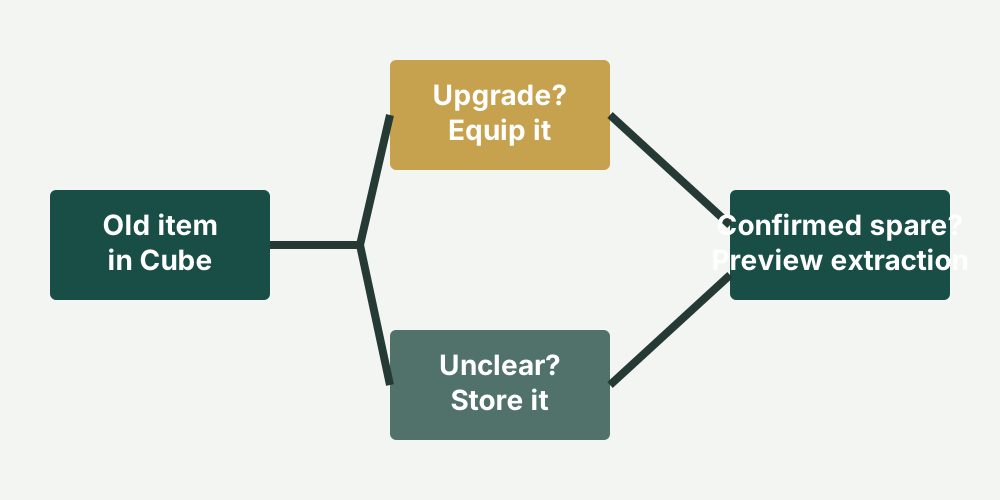
Before extracting
Section titled “Before extracting”- Compare the old item with the equipped item and any alternate set.
- Check whether it is locked, bound, enhanced or otherwise invested in.
- Keep the only copy if you do not understand its role.
- Enter Item Extraction from the Cube.
- Select one or more eligible items and read the preview.
- Confirm only when both the selected items and displayed return are correct.
The current verified material does not support a universal table of extraction output by rarity, enhancement or level. This page therefore does not promise a fixed yield.
Common mistakes
Section titled “Common mistakes”Batch selection is efficient but makes a wrong click more expensive. Review every selected icon before confirming. Do not use a Taiwan/Korea yield table as proof of a global-build return without a version match.
After clearing inventory, return to the launch checklist. The classes record helps decide whether an alternate role is relevant, while the monetization record separates paid options from ordinary inventory decisions.